Showing posts with label work stuff. Show all posts

Sunday, 5 May 2013

Data Center LAN Connectivity Design Guide

Design Considerations for the High - Performance Enterprise Data Center LAN


The data center LAN is a critical corporate asset, connecting servers, applications and storage services in the enterprise. This strategic tool supports vital day-to-day operations and is crucial for corporate success. The data center LAN faces a number of challenges as enterprises are centralizing applications and consolidating servers to simplify operations and reduce costs while business productivity increasingly depends on operations carried out at distributed branch offices. As businesses continue to expand across the globe, downtime is not an option—a data center LAN must efficiently operate 24x7.

These trends raise the density, scalability, throughput and high availability (HA) requirements of the data center LAN. Trying to support these needs with low-density, single-function legacy equipment is not only inefficient, it’s not cost effective, adversely affecting performance, reliability, valuable rack and cabinet space as well as driving power and cooling costs higher. Enterprises are also moving towards applications that use a Service-Oriented Architecture (SOA ) and also provide Software as a Service (SaaS), both of which present a new set of throughput, performance and HA requirements for the data center LAN. New technologies such as virtualization are needed to increase scalability, efficiency and lower total cost of ownership.

Trends and Challenges
  1. Centralization of Data Centers - To reduce costs, simplify operations and comply with regulatory guidelines, more and more enterprises are consolidating their data centers, In addition to HA requirements ensuring nonstop operations, centralization raises new latency and security issues for the data center LAN.
  2. Server Consolidation - Backup and security concerns must be addressed, and companies also demand consolidated, centralized management solutions that help reduce the time and resources devoted to keeping data centers online and operational.
  3. Virtualization - A technology used to share resources, makes single physical resources appear as many individually separate resources. Conversely it also makes individually separate physical resources appear as one unified resource. Virtualization can also include making one physical resource to appear, with somewhat different characteristics, as one logical resource. Virtualizing a network is enabled by various technologies that provide data-plane virtualization, control-plane virtualization and management-plane virtualization. An example of data-plane virtualization is using a using 802.1q VLAN tagging on single physical network interface to provide security to multiple network segments. Supporting multiple routing domains and protocol instances on a single router using Virtual Routers and/or VRF are examples of control-plane virtualization. Support for multiple logical firewall/VPN security systems using Virtual Systems (VSYS) in a single device is a management-plane virtualization example. Virtualization delivered via MPLS and VPLS also enable an ultra fast data center backbone network in order to meet the performance demands of the consolidated LAN architecture. Virtualization can enable multiple switches to act as one, simplifying device configuration and management while also increasing reliability and reducing potential choke points.
  4. Storage - As businesses increasingly rely on vast stores of data to make business decisions and meet compliance regulations, scalable, high-performance storage solutions are becoming a necessity for today’s enterprise. Fibre Channel still maintains a large portion of the SAN market, but the growing prevalence of gigabit Ethernet (GbE) and the simplicity of deploying and managing an Ethernet-based Network Attached Storage (NAS) are making iSCSI an attractive, low-cost alternative. Additionally, Ethernet-based NAS solutions more easily take advantage of virtualization to rapidly scale and provide HA. While 4 or 8 Gbps Fibre Channel offers a speed advantage over GbE, Network interface Cards (NICs) offering TCP Offload capabilities greatly enhance iSCSI performance. In addition, the emergence and adoption of lower-cost 10 GbE allows iSCSI to outperform Fibre Channel and accommodate any high-speed storage needs.
  5. Service Oriented Architecture (SOA) - In an SOA -based environment, services exchange messages to interoperate, in some instances generating millions of messages each, which can impact LAN bandwidth needs. Web services are often used to implement SOA and provide ubiquitous access to the applications. Web services put extra processing demands on servers while also increasing network bandwidth requirements as Web-based applications use far more bandwidth than client-server applications. Virtualization is often used in SOA environments to increase the reliability of services and help scale capacity. SOA also broadens application access to internal and external users, raising security concerns. Additional security issues are raised as application services expose capabilities to other applications which require a different level of security.
  6. Software as a Service (SaaS) - Many common enterprise applications, such as customer-relationship management (CRM), human-resource management (HRM) and supply-chain management (SCM), can now be delivered in the Software as a Service (SaaS) model. Many of these Web-based services require, in certain instances, more than 10 times the bandwidth of their LANbased counterparts, seriously impacting performance, reliability, availability and bandwidth requirements
  7. An Increasingly Decentralized Workforce -  As employees in remote or branch offices become increasingly dispersed across different time zones, HA time requirements also increase. In addition, virtualized operations have expanded enterprise user populations beyond employees to include contractors, consultants, business partners and customers who may be anywhere in the world.
  8. Green and Environmentally Friendly Data Center - As old data center facilities are upgraded and new data centers are built, it is important to ensure that the data center network infrastructure is designed for maximum energy and space efficiency as well as a minimal environmental impact. Power, space and cooling requirements of all network components must be accounted for and compared with different architectures and systems so that the environmental and cost impacts across the entire data center as a whole can be ascertained—even down to the lighting. Many times, it might be more efficient to implement high-end, highly scalable systems that can replace a large number of smaller components, thereby delivering energy and space efficiency.
  9. The Proliferation of Unified Communcations - The adoption of Unified Communications systems that combine voice, video and data services is on the rise. Such deployments have a direct impact on the high-performance and HA requirements of a data center LAN. For example, not only must adequate LAN and WAN bandwidth be provisioned, but quality of service (QoS) rules must identify, classify and prioritize traffic to deliver effective VoIP communication services.
  10. Increasing Focus on Security - As employees and non-employees are being granted an ever-widening range of network access, robust security is necessary at all levels in the corporate and data center LANs. IT must protect applications, data and infrastructure by applying appropriate access controls without inhibiting user efficiency or negatively impacting application performance. IT must also mitigate risks from untrusted sources such as non-employees, whose PCs and networks are not under IT control. The move to globalize and virtualize the enterprise puts new demands on IT to secure remote access communications and protect site-to-site communications, including connections between data centers and from data centers to backup sites. IT must also fortify the network perimeter as increasing volumes of Web and other traffic types flow across it.
Data Center Network Design Considerations


A new data center LAN design is needed as legacy solutions cannot meet these key requirements, nor reduce costs and streamline operations. The LAN design must also scale and accommodate emerging computing trends and additional network services without an entire redesign. The new design should be architected in order to maximize efficiency gains from technologies like virtualization.

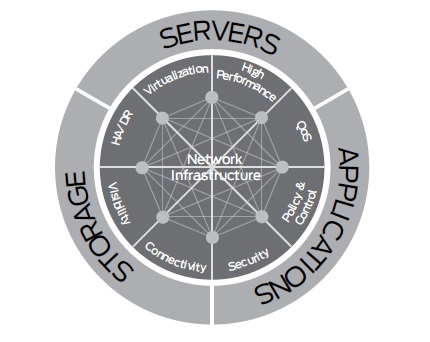
  1. Services Required in the Data Center - The following high-level services are required of data centers to provide carrier-class network service throughout the enterprise and thus optimize efficient business operations. Each of these areas is addressed in more detail in this document and, where appropriate, additional considerations or challenges for a specific service, feature or data center category are presented.
  2. High Availability (HA) - With the consolidation and centralization of servers and resources, HA is a key requirement from the data center LAN. Redundancy of critical subsystems and seamless failover are needed for routers, security appliances, and any other devices on the user-to-data center path. Designing HA into the data center network requires consideration of three key aspects.  Network devices deployed within the data center should support device-level HA with components such as redundant power supplies, fans and route engines. The operating system software running on data center network devices should have a modular architecture so that software failures will be isolated to a single process and not impact other critical operating system services, ensuring system and network availability. Features such as in-service software updates (ISSU ) also maintain network availability while still providing network software updates. Network availability should be enabled by using combinations of redundant devices and path (for both external and internal connectivity) and critical device redundancy to ensure network operations and business continuity. Operational availability denotes a set of network operating system attributes that ensure simple and efficient operation of the data center network. Network devices must support open management standards and consistent software features for simple, error-free configuration that maintains network availability. Also, network devices should support scripting to enable automation of operational tasks that free resources for other, more critical tasks.
  3. Visibility - Visibility into network traffic and security events is important in order to effectively maintain and manage network resources. Real-time and historical reporting enables IT to maximize performance and availability across the entire data center infrastructure, meet regulatory requirements, and plan for future capabilities and capacity. Collecting IP traffic flow statistics can give enterprises valuable insight into areas such as data flow, resource utilization, fault isolation, capacity planning, tuning and offline security analysis. WAN utilization and user-level visibility can help IT better support application performance by leveraging network services and other resources. Security visibility is crucial to granularly view security events to help determine how these events get handled. Further, extending this visibility to develop a deeper understanding of application-specific traffic is crucial for understanding operational and performance patterns that can impact bottom-line productivity. For example, compression and acceleration technologies can be applied at the network layer to accelerate email applications, or application-based policies can ensure that business critical applications meet or exceed performance requirements when other non-essential bandwidth hungry services like YouTube are accessed.
  4. Network Connectivity - Customers, partners and employees all require fast access to applications and information. Connectivity has to be absolutely reliable, consistent and provide low latency. Modern applications, especially those provided as a Web service, demand significant network performance. At the same time, the challenge of working from any location in or out of the enterprise further increases complexity. The following critical aspects of external network connectivity need to be considered as part of the data center network design :  High-speed (10 GbE) LAN connectivity for servers and storage devices,  WAN connectivity to enable branch office and campus users to access applications and shared resources,  Internet connectivity to enable partner access as well as secure remote access for remote and mobile users, Super-fast data center backbone connectivity for purposes of data replication and business continuity and use of technologies like VPLS/MPLS. The data center LAN hosts a large number of servers that require high speed and highly available network connectivity. Multiple LAN segments and networks may be deployed with differing levels of security, capacity and other services. Local server connections of one gigabit per second or greater for local servers, with a forward view towards the proliferation of 10 GbE, and also utilizing 10 GbE for connecting to upstream or downstream devices should be a consideration.
  5. Security - Security is critical to the entire corporate LAN and especially to the data center LAN. Access to centralized networks and applications must be ubiquitous and pervasive, yet remain secure and controlled. The security design must employ layers of protection from the network edge, through the core, and both in front of and between the application computing systems, providing in-depth defense. The protection must be integrated into the network operating system and not simply layered on top. A tiered, integrated security solution protects critical network resources that reside on the network. If one tier fails, the next tier will stop the attack and/or limit the damages that may occur. This allows an IT department to apply the appropriate level of resource protection to the various network entry points based upon their different security, performance, and management requirements. Today’s data center networks needs not only to effectively handle unmanaged devices and guest users attemptingnetwork access; they also need to support unmanageable devices, post admission control, and application access control, visibility and monitoring. In addition to Unified Threat Management (UTM) services, security policies supporting demilitarized zones (DMZs), ensuring quality of service , mitigating Denial of Service (DoS) and distributed DoS (DDoS) attacks and threats, and ensuring that the organization meets compliance criteria are needed. All security policies should be centrally managed and remotely deployed.
  6. Policy and Control - Policy-based networking is a powerful concept that enables efficient management of devices in the network, especially within virtualized configurations, and can be used to provide granular network access control. The policy and control capabilities should allow organizations to centralize policy management while at the same time offer distributed and even layered enforcement. The network policy and control solution should provide appropriate levels of access control, policy creation and management, and network and service management, ensuring secure and reliable networks for all applications. The data center network infrastructure also should easily integrate into customers’ existing management frameworks and third-party tools such as IBM Tivoli and HP software and also provide best-in-class centralized management, monitoring and reporting services for network services and infrastructure. 
  7. Quality of Service (QoS) - For optimal network performance, QoS is a key requirement. QoS levels must be properly assigned and managed to ensure satisfactory performance for various applications through the data center and across the entire LAN. A minimum of six levels of QoS are recommended, each of the following determines a priority for application of resources:  Gold Application Priority, Silver Application Priority,  Bronze Application Priority, Voice, Video, Control Plane. In MPLS networks, network traffic engineering capabilities are typically deployed to allow configuration of Label Switched Paths (LSP) with the Resource Reservation Protocol (RSV P), LDP, or BGP. This is especially critical with voice and video deployments as QoS can mitigate latency and jitter issues by sending traffic along preferred paths, or by enabling fast reroute in anticipation of performance problems or failures. The LAN design should allow the flexibility to assign multiple QoS levels based upon end-to-end assessment and allow rapid and efficient management to ensure end-to-end QoS throughout the enterprise.
  8. High Performance - To effectively address performance requirements related to virtualization, server centralization and data center consolidation, the data center network must offer high-capacity throughput and processing power with minimal latency. The data center LAN also must boost the performance of all application traffic, be it local or remote. The data center must offer a LAN-like user experience for all enterprise users regardless of their physical location. In order to accomplish this, the data center network must enable optimization for applications, servers, storage and network performance. WAN optimization techniques including data compression, TCP and application protocol acceleration, bandwidth allocation, and traffic prioritization are used to improve performance of WAN traffic. These techniques can also be applied to data replication, backup and restoration between data centers and remote sites, including disaster recovery sites. Beyond WAN optimization, critical infrastructure components such as routers, switches, firewalls, remote access platforms and other security devices must be built on non-blocking modular architecture. This ensures that they have the performance characteristics necessary to handle the higher volumes of mixed traffic types associated with centralization and consolidation, as well as the needs of users operating around the globe.


Friday, 5 April 2013

EX9200 for Data Center and Campus Cores


Firstable, there's a big question about Juniper's New Core Switch EX9200, does EX9200 signal end of QFabric ??, an article from SearchNetworking said "Juniper launches MX-based EX9200 for data center and campus cores" 

Sekarang growth amount of mobile user sudah jauh meningkat dibandingkan beberapa dekade lalu, Infrastruktur, Enterprise application semakin kompleks, dan membutuhkan jalur data yang reliabe, koneksi yang cepat dan redundant.

Customer Juniper yang berharap bandwidth yang lebih tinggi dan next gen-nya EX8200 series sebelumnya sudah menunggu lama, Cisco sudah punya N7K yang merupakan solusi Datacenter, Campus Core, dan OTV (Overlay Transport Virtualization) sekaligus, katanya sih OTV itu gunannya untuk men- simplified Ethernet VPN, detailnya gk tau seperti apa. Nah, mungkin Juniper sudah punya dedicated appliance untuk solusi datacenter yaitu QFabric, Campus core EX8200 series, dua duanya bisa Virtual Chassis (sama seperti OTV). Juniper masih melanjutkan produksi EX8200, tapi tidak lagi invest untuk develop Hardware Platform-nya. 
Juniper menempatkan EX9200 sebagai solusi untuk Datacenter dan Campus Core Switch in one modular Switch. EX92 sama MX chassis identik, hampir sama, tapi tidak bisa digonta ganti line card-nya. Semua Routing Engine, Line Card, dan Supervisor pada EX9200 merupakan Hardware baru dan tidak cocok untuk MX Chassis. hanya pheriperal-nya saja yang bisa digonta ganti such as Power supply sama Fan, kabel power juga sama. 
Oke komponen/linecard untuk EX9200 brand new semua tapi dari segi hardware spek similiar comparable dengan MX, port densitynya si MX sama seperti EX9200 ; fabric capacity juga sama 240Gbps per slot.

Juniper EX9200 punya 3 model - 4 slot, 8 slot, sama 14 slot. 40GbE port sudah tersedia, 100GbE akan tersedia pada Q4 tahun ini. Seperti EX8200, EX9200 juga support virtual chassis, meskipun fitur parity-nya take some time.

"There were just some limitations with the platform that didn't allow us to scale to very high densities,We also wanted to introduce this whole new programmability aspect as we rolled out our next-generation data center and campus core. That's why we made the decision to build the EX9200 around the MX. It gave us high-speed interfaces and programmability.

Agak rancu memang mengenai strategi market Juniper untuk memasarkan EX9200, secara tidak langsung pasti tabrakan dengan QFX series sebagai datacenter solution sebelumnya. meskipun EX9200 dipasarkan sebagai datacenter dan campus core platform, Juniper tetap mendevelop QFX sebagai solusi arsitektur datacenter alternatif untuk single tier.

Feature


EX9200 Chassis Option


EX9200 Line Cards


EX9200 collapses layers in campus, data center, and combined campus and data center environments.


Wednesday, 13 February 2013

Delivering BYOD concept through MAG Series Junos Pulse


Menjamurnya berbagai gadget canggih seperti smartphone, Tab  hingga convertible PC menimbulkan gaya hidup baru dalam dunia kerja, adopting Bring Your Own Device (BYOD) lah . . . Para karyawan pasti membawa sendiri perlengkapan kerjanya, perusahaan hanya memberikan akses data dan jaringannya
Terus Apakah fonemena ini akan meningkatkan produktivitas karyawan? Apakah akan lebih mudah bekerja dengan konsep BYOD? Keamanannya bagaimana? Jawabnya tentu belum pasti. Karena banyak faktor yang mempengaruhi produktivitas dan efektif apa tidak.

Dari sisi user, type user khan macam-macam ada yang benar-benar mengoptimalkan sistem di perusahaannya dengan menggunakan gadget / device, ada yang malah hanya sebagai alasan untuk tidak ke kantor (khan bisa via email, khan ada vidcon, khan ada dropbox . . . bla bla bla) padahal tidak serius menjalankan sistem perusahaan yang ada. 

Saya tidak mau bahas lebih jauh dari sisi User dan Trend BYOD seperti apa, tapi lebih ke teknologi apa saja yang mendukung konsep BYOD ini berjalan, aksesnya bagaimana, alur data-nya seperti apa, authentifikasi-nya bagaimana, dll. Juniper Networks menawarkan solusi UAC yang memang sesuai dengan konsep BYOD ini (MAG Series) Sekalian saya belajar dari referensi yang ada, saya rangkum di sini.


MAG Series Gateway menawarkan keamanan koneksifitas dan akses kontrol, ada 4 jenis. Dibedakan berdasarkan model yang bisa di sesuaikan dengan besar kecilnya perusahaan yang akan menggunakan perangkat ini. MAG2600 mempunyai fitur SSL VPN atau Unified Access Control (UAC) untuk perusahaan kelas SMB (Small Medium Business), device-nya kecil, mudah dibawa, dan di deploy dimana saja. Memiliki 1 Fix Application Engine (bukan modular) dan support sampai 100 concurrent  SSL VPN atau 250 concurrent  UAC user. Sebagai fungsi alternatif MAG2600 bisa di inject license untuk Enterprise Guest Access, yang support sampai 200 concurrent Guest User. Model berikutnya adalah MAG4610 MAG4610 Support SSL VPN dan UAC yang tertanam di fixed module-nya. Mendukung 1000 concurrent SSL VPN atau 5000 concurrent UAC users. MAG6610 provide skalabilitas dan fleksibilitas di fitur SSL VPN atau UAC-nya, masing masing fitur (SSL VPN dan UAC) memiliki module slot yang berbeda, minimal membutuhkan satu module yang di install (MAG-SM160 atau MAG-SM360 untuk mengaktifkan SSLVPN atau UAC). Di type ini sudah termasuk chassis management single sign on yang mengijinkan network admin untuk configure semua service module dari central console. Support sampai 20,000 concurrent SSL VPN user atau 30,000 concurrent  UAC users. Nah Type yang paling tinggi adalah MAG6611 yang support sampai 4 module bisa di mix sesuai kebutuhan, mempunyai SSO (Single Sign on) juga seperti MAG6610, support sampai 40,000 concurrent SSL VPN  users, 60,000 concurrent UAC users.

Matrix-nya ?? nih . . .


Feature and Benefits


Licensing

Licensing-nya lumayan komplex, ada beberapa lic yang sifatnya mandatory ada yang optional, Common Lic tersedia sebagai User Lic jadi berdasarkan jumlah user baik itu untuk SSL VPN atau UAC, shared lic lah modelnya. bisa sebagai SSL VPN User session atau NAC user Session, menarik.
Lic-nya juga "additive" misal sebelumnya kita sudah beli user lic sebanyak 100 user lic, ternyata next user growth bertambah menjadi 200, tinggal ditambahkan lic yang mendukung 100 lic, jadi akan diakumulasikan menjadi 200 lic.
Untuk clustering sendiri tidak membutuhkan lic, metodenya ada dua ; pertama, tanam jumlah lic yang sama di kedua device yang akan di cluster, kedua, inject lic di salah satu device yang akan di cluster nantinya bisa di manage di Central Manager untuk pembagian lic-nya. Keuntungannya? dengan statefull peering dan failover jika salah satu device down, sistem konfigurasi (authentification server, authorization group, bookmarks), user profile settings, dan user session tidak mengalami gangguan. Failover, user tidak perlu re-login untuk hak aksesnya dan no-downtime.

Clustering options :
MAG2600 - clustered in device
MAG4610 - clustered in device
MAG6610 - clustered in module (MAG-SM160/MAG-SM360)
MAG6611 - clustered in module (MAG-SM160/MAG-SM360)

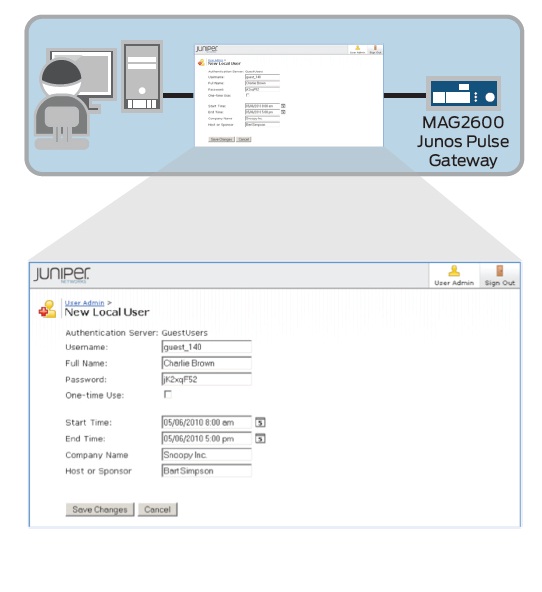
Enterprise Guest Access

Lic ini lebih berfungsi sebagai ke UAC solution, kita bisa mengatur guest access yang masuk ke network internal. kita bisa melakukan authentifikasi secara secure, health check ke device yang akan masuk ke network, kontrol hak akses mereka secara detail, policy-nya, regulasinya, dan lama aksesnya.

Workflow-nya seperti ini :


Ini merupakan high level view untuk Guest access option, di diagram ini MAG device terintegrasi secara in-line , antara wireless/wired user dengan network, MAG yang sudah running Enterprise Guest Access lic, akan mem-block user yang tidak punya user account di portal. 

sample workflow :

1. Guest Access admin akan create user account di portal


2. Admin akan menyediakan atau men-set credential dari user ex: Email, Fax, Print


3. Ketika guest akan mengakses network, akan di direct ke MAG Gateway dan Log in ke captive portal yang ada.


4. Login berhasil, authentifikasi dilakukan, jika berhasil user akan bisa mengakses network dengan access control, policy, area of network yang sesuai dengan user setting sebelumnya.


5. Jika Session dari user sudah expired, secara otomatis akan Log-out untuk waktu yang sudah ditentukan.


Feature and Benefit


Secure access service . . .

more information www.juniper.net 


Wednesday, 6 February 2013

Juniper SRX High Availability


Devices fail, network fails, disaster occurs. But still, passing traffic is our goal. SRX provides high availability feature and is different from traditional HA devices. When one router fails, the other router must know about the device configuration and traffic sessions that first router was dealing with. Otherwise, the second router needs to relearn all the routes and sessions making unnecessary traffic congestion in the network. The interaction between two HA device is unique compared to other vendors. To get into more detail about High Availability let’s learn about Juniper SRX High Availability basics.

Juniper SRX High Availability Basics

Chassis Cluster

In HA mode the SRX devices act like a single device creating a chassis cluster. In chassis cluster the two devices acts like one. The flexible PIC concentrator (FPC) starts from zero (0) in one device and ends at other device’s last FPC number. For example in the given figure, the FPC is starting from zero in device A and ends with FPC nine in device B.


Control Plane

The control plane and data plane in SRX is separated. In HA, there can be only one RE no matter what. If the primary RE fails, then only secondary device takes the initiative of primary RE. The control plane synchronizes the state between the routers by exchanging the Hello messages. On RE the process called JSRPD and KSYNCD. JSRPD stands for Junos Stateful redundancy protocol daemon. This process is responsible for exchanging messages and doing failover between devices. Similarly, KSYNCD stands for kernel state synchronization daemon. This process is responsible for synchronizing the kernel state between the two devices.

Data Plane

Remember when we talked about traffic sessions and device configuration that second device must know when first device fails. This information is exchanged between devices by the data plane. Data plane simply synchronizes the sessions and services between the devices. Sessions are current information about the traffic flow. For example if a user is browsing Google’s mail then the session is maintained by the router. This session information is synchronized between devices. 

Virtual Private Network Protocol


Virtual Private Network (VPN) is an internal network that is established between two or more end points via the Internet or other media. VPN creates a tunnel within the media between two end points. VPN also uses various methods and encryption mechanism to secure the VPN connection. There are different types of VPN protocols available which may suit to you based on your requirement. Virtual private network protocol types are: -
  1. PPTP: – Point-to-Point Tunneling Protocol (PPTP) is the layer 2 VPN tunneling protocol that relies on Point-to-Point (PPP) protocol. PPTP operates at TCP port number 1723. Virtual Private Network can be configured on Windows or Linux or MAC platform using PPTP protocol.In Windows, PPTP protocol can be configured with conjunction with various authentication protocols for security. Authentication protocols like PAP, CHAP, MS-CHAPv1, MS-CHAPv2 and EAP-TLS can be used in VPN authentication. Microsoft Windows uses Microsoft Point-to-Point Encryption (MPPE) for encrypting the VPN connection while using MS-CHAPv1, MS-CHAPv2 and EAP-TLS as authentication mechanism.
  2. L2TP: – Layer 2 Tunneling Protocol (L2TP) is layer 2 VPN tunneling protocol. It doesn’t have its own encryption and authentication mechanism. It relies on Internet Protocol security (IPSec) for confidentiality, integrity and authentication. L2TP is a combination of Cisco’s Layer 2 forwarding protocol (L2F) and PPTP. When using L2TP/IPSec for VPN solution, you will require two certificates. One for server and another for client.
  3. SSTP: – Secure Socket Tunneling Protocol (SSTP) is an application layer tunneling protocol. It uses secure socket layer (SSL) for encryption, authentication and integrity of data by using secure HTTP protocol. So SSTP protocol uses 443 port to operate. SSTP was introduced by Microsoft in server 2008. By this protocol VPNs can be established using HTTPS which much secure and easier to implement. Other application layer VPNs has also been developed by Cisco and Juniper that uses HTTPS for VPN establishment.
  4. IPSec: – IPSec VPN is very secure and complex in configuring VPN connection. It is configured mostly in site to site type of connection between offices or enterprises. This VPN protocol works on layer 3 of OSI model. In IPSec, traffic protection is provided by two security protocols i.e. Authentication Header (AH) and Encapsulation Security Payload (ESP). AH provides integrity and authentication of data whereas ESP provides confidentiality, integrity and encryption. In real world, IPSec is used by combining the power of both AH and ESP protocol using internet key exchange (IKE) protocol. IKE is used to negotiate, create and manage the connection before and after the connection exists between two points. IKE also negotiates the identities of both VPN end points automatically during predefined interval making VPN connections more secure. IPSec VPN is provided by Juniper’s security gateways.


VLAN Difference between Juniper and Cisco Switches

A VLAN (Virtual Local Area Network) is a logical LAN segment which have unique broadcast domain. Basically, VLAN divides one physical switch to multiple logical switch. You can configure hundreds of VLANs in one EX series switch. No matter if its EX4200, EX3200 or EX2200. Today I will show you VLAN difference between Juniper and Cisco switches.


VLAN Difference between Juniper and Cisco Switches

There are two port modes in Juniper switch i.e. access mode or trunk mode. The interface in access mode connects to a network device, such as laptop or an IP phone. The interface in trunk mode connects to other switches in the network. There are many differences between Juniper and Cisco switches.
  1. In Cisco switches the default port mode is dynamic desirable auto but in Juniper switch the default port mode is access mode.
  2. In Cisco switches the default VLAN is untagged and is the native VLAN i.e. VLAN 1 but in Juniper there is no default native VLAN. You must configure it manually.
  3. In Cisco switches the trunk ports accept all VLANs in the range of 1 to 4095 by default but in Juniper, trunk ports do not support any VLANs. You have to make it support manually.
  4. In Juniper switches, VLAN named Default is present by default and all the interfaces are under this default VLAN.
  5. Unlike Cisco switches Juniper switches doesn’t support VTP (VLAN Trunking Protocol) or DTP (Dynamic Trunking Protocol). Juniper switches support GVRP (Generic Attribute Registration Protocol) though.
  6. Juniper switches has two port modes i.e. access and trunk mode. Cisco switches have five port modes i.e. dynamic desirable auto, dynamic desirable, access, trunk and nonegotiate mode.
  7. Juniper switches support 802.1Q protocol for trunk ports. Cisco switches support both 802.1Q and ISL (Inter Switched Link) protocols.

Wednesday, 16 January 2013

Juniper Networks QFabric Switches


The Juniper Networks QFabric family of products offers a revolutionary approach that delivers dramatic improvements in data center performance, operating costs, and business agility for enterprises, high-performance computing systems, and cloud providers. The QFabric family implements a single-tier network in the data center, enabling improvements in speed, scale and efficiency by removing legacy barriers and improving business agility.
The QFabric family includes three members:
  • QFabric System: Composed of three separate components—the QFabric Node, QFabric Interconnect and QFabric Director—the QFabric System creates a high-performance, low-latency fabric that unleashes the full power of the data center with the simplicity of a single switch.
    • QFabric Node acts as the entry and exit into the fabric
    • QFabric Interconnect is the high-speed transport device for interconnecting QFabric Nodes
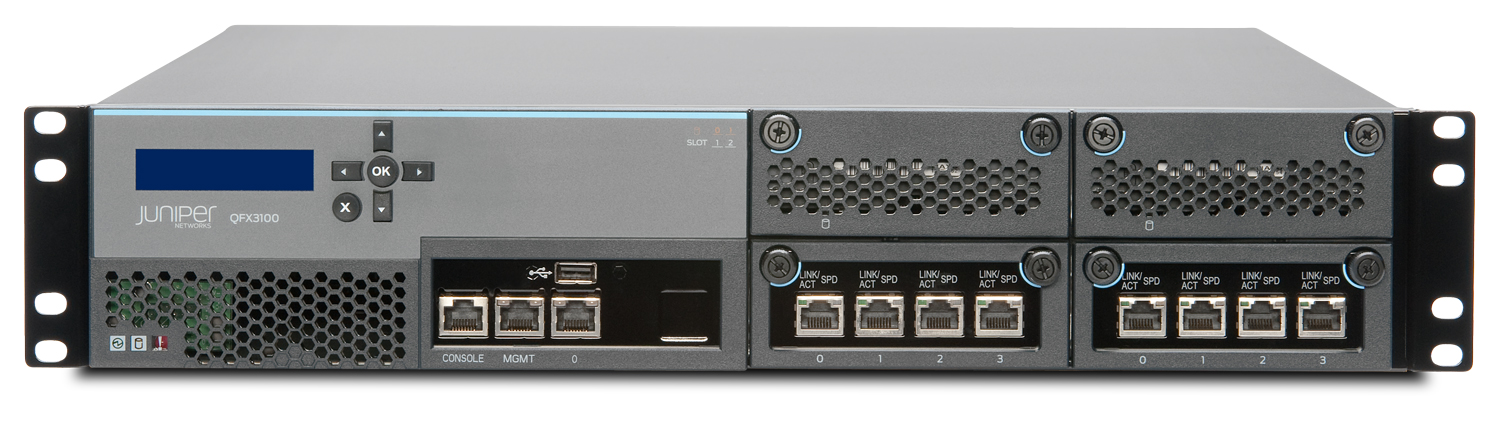
    • QFabric Director provides control and management services to deliver a common window for managing all devices as a single device.
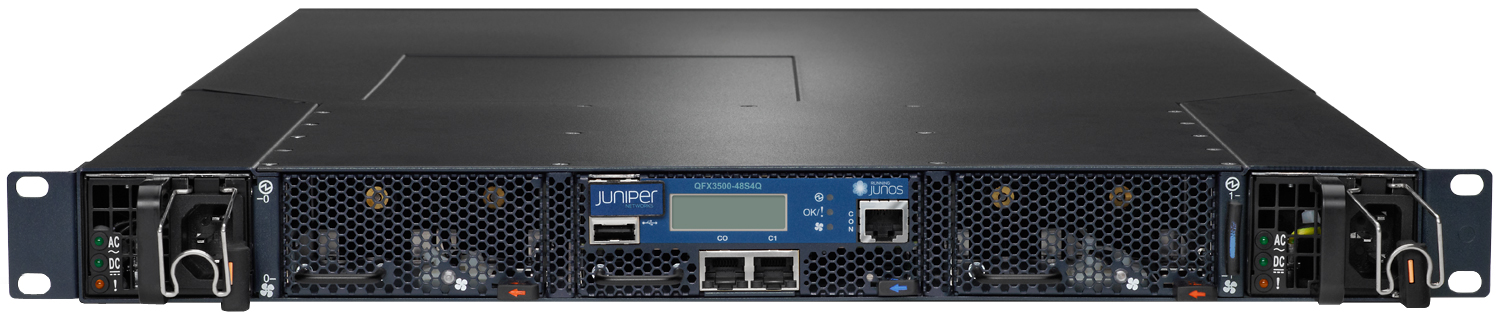
  • QFX3500 Switch: The QFX3500 is a standalone 48-port 10GbE top-of-rack switch with four 40GbE uplink ports and Fibre Channel over Ethernet (FCoE) and FC gateway functionality. With a simple software and configuration change, the QFX3500 can also provide the QFabric Node functionality in a QFabric System.
  • QFX3600 Switch: The QFX3600 offers 16 QFSP+ ports, delivering a high-performance, feature-rich 40GbE/10GbE top-of-rack switch with iSCSI and FCoE functionality for highly demanding data center environments (available 2H12). The QFX3600 also provides QFabric Node functionality in a QFabric System.


The highly scalable, low-latency QFabric System supports thousands of ports within a single-tier data center or cloud, enabling any-to-any connectivity with the simplicity of a single, highly resilient switch.


The QFabric System, composed of multiple components working together as a single switch, delivers any-to-any connectivity, high performance, and management simplicity, making it the ideal foundation for cloud-ready, virtualized data center environments.
The QFabric components appear as a single switch, enabling any-to-any connectivity for servers, storage, existing network components, and other critical systems in the data center while providing a foundation for cloud-ready, virtualized and mobile computing environments.
The QFabric System components include:
  • QFabric Nodes, high-density, fixed-configuration edge devices that connect to servers, storage and other networking devices using standards-based Ethernet interfaces, providing access into and out of the fabric
  • QFabric Interconnect, a high-speed transport device that connects all QFabric Node edge devices in a full- mesh topology
  • QFabric Director, which provides all control and management services for the QFabric System, enabling it to be managed and operated as a single device
The QFabric System is highly scalable and has unmatched simplicity that improves application performance by delivering low latency and converged services in a nonblocking and lossless architecture. Featuring Layer 2, Layer 3 and Fibre Channel over Ethernet (FCoE) capabilities, the QFabric System is available in two models:
  • QFabric QFX3000-M, designed for mid–tier, satellite and container data center environments, supports up to 768 10GbE ports with an average latency of 3 microseconds port to port
  • QFabric QFX3000-G, designed for large enterprises, service providers, and cloud data center environments, supports up to 6,144 10GbE ports with an average latency of 5 microseconds port to port
For investment protection, existing QFabric System components can be redeployed between the two models, greatly simplifying flexibility and migration. For example, users can initially deploy a QFX3000-M and, as their 10GbE demands grow, they can migrate to a QFX3000-G with the simple replacement of the QFabric Interconnect, dramatically increasing scale.
Form Factor
Distributed switch composed of three components:
  • QFX3500/QFX3600 QFabric Node
  • QFX3600-I/QFX3008-I QFabric Interconnect
  • QFX3100 QFabric Director
Dimensions
  • QFX3500 QFabric Node: (W x H x D) 17.25 x 1.75 x 28 in (43.82 x 4.45 x 71.12 cm); 1U
  • QFX3600 QFabric Node: (W x H x D) 17 x 1.74 x 19.4 in (43.2 x 4.4 x 49.3 cm); 1U
  • QFX3600-I QFabric Interconnect: (W x H x D) 17 x 1.74 x 19.4 in (43.2 x 4.4 x 49.3 cm); 1U
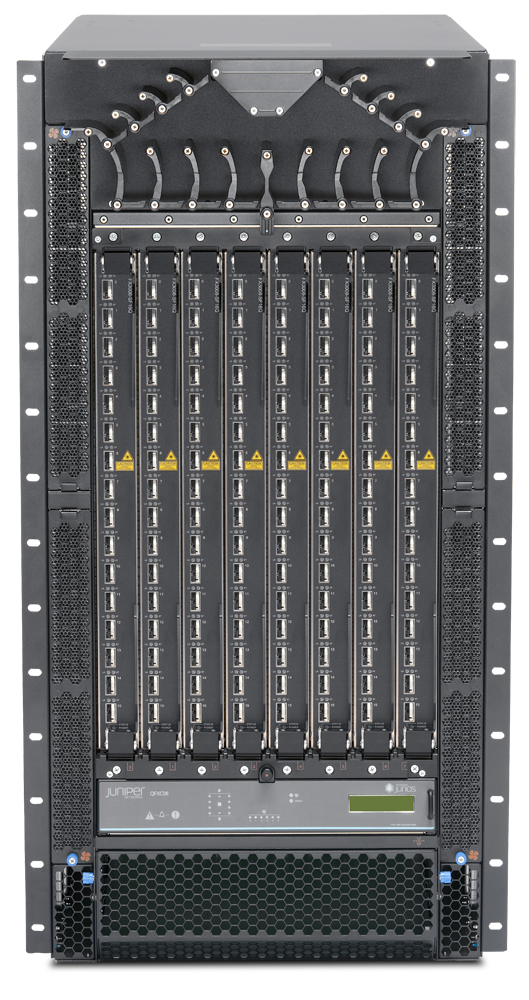
  • QFX3008-I QFabric Interconnect: (W x H x D) 17.5 x 36.75 x 32 in (44.45 x 93.34 x 81.28 cm); 21U
  • QFX3100 QFabric Director: (W x H x D) 17.5 x 3.5 x 23.75 in (44.45 x 8.89 x 60.33 cm); 2U
Data Rate
QFX3000-M: 5.12 Tbps switching capacity
QFX3000-G: 40 Tbps switching capacity
Port Densities
From 200 to 6,144 server-facing 10GbE/FCoE ports in a single QFabric System
Latency
  • 3 to 5us across fabric, under typical loads
  • <1us per QFX3500 or QFX3600 QFabric Node
Resiliency
QFX3500/QFX3600 QFabric Node:
  • Redundant power supplies
  • Redundant fan trays
QFX3600-I QFabric Interconnect:
  • Redundant power supplies
  • Redundant fan trays
QFX3008-I QFabric Interconnect:
  • Redundant power supplies
  • Redundant fabric cards
  • Redundant control boards
QFX3100 QFabric Director:
  • Redundant power supplies
  • Redundant disk drives
Power Options
QFX3500 QFabric Node:
  • Power feed (voltage): 100 to 240 V AC (single phase) and 50/60 Hz or -40 to -72 V DC
  • Power consumption (maximum): 365 Watts
  • Power consumption (nominal): 295 Watts
QFX3600 QFabric Node:
  • Power feed (voltage): 100 to 240 V AC (single phase) and 50/60 Hz or -40 to -72 V DC
  • Power consumption (maximum): 345 watts
  • Power consumption (nominal): 255
QFX3600-I QFabric Interconnect:
  • Power feed (voltage): 100 to 240 V AC (single phase) and 50/60 Hz or -40 to -72 V DC
  • Power consumption (maximum): 345 watts
  • Power consumption (nominal): 255
QFX3008-I QFabric Interconnect:
  • Power feed (voltage): 200 to 240 Volt AC (single phase); 240 Volt (3 Phase)
  • Power consumption (maximum): 6,420 Watts (fully loaded)
  • Power consumption (nominal): 4,620 Watts (fully loaded)
QFX3100 QFabric Director:
  • Power feed (voltage): 100 to 240 Volt AC (single phase)
  • Power consumption (maximum): 476 Watts
  • Power consumption (nominal): 220 Watts
Operating System
Junos
Traffic Monitoring
  • Port-based
  • LAG port
  • VLAN-based
  • ACL-based
  • Mirror to local and remote destinations (L2 over VLAN)
QoS
  • Policers (ingress and egress): 1,500 per QFX3500/QFX3600 QFabric Node
  • Queues: 12 per QFX3500/QFX3600 QFabric Node—8 unicast and 4 multicast
MAC Addresses
120,000 – 1,536,000
Jumbo Frames 
9216 Bytes
IPv4 Unicast Routes
16,000
Number of VLANs 
4,096
FCoE/FC
  • FCoE Interfaces: 6,144 max
  • FC Interfaces: 1,536 max
  • Transit switch / FIP snooping FCoE sessions: 48,000 max
  • VF_Ports: 384,000 max
Warranty
Juniper standard one-year warranty


High-performance, low-latency, feature-rich L2/L3 switch delivers wire-speed 10GbE throughput and standards-based Fibre Channel I/O convergence capabilities for the most demanding data center environments while providing a fabric-ready.


The QFX3500 switch delivers a high-performance, low-latency, feature rich L2 and L3 solution for supporting a wide range of deployment scenarios including tr
aditional and virtualized data centers, high-performance computing, network-attached storage, converged server I/O, and cloud computing. A versatile, compact, high-density 10GbE platform that runs the same Junos OS as other Juniper switches, routers and security platforms, the QFX3500 also delivers a fabric-ready edge solution for the Juniper Networks QFabric System.
The QFX3500 offers 63 dual-mode small form-factor pluggable transceiver (SFP+/SFP) ports and four quad small form-factor pluggable plus (QSFP+) ports in a 1 U form factor, delivering feature-rich L2 and L3 connectivity to networked devices such as rack servers, blade servers, storage systems and other switches in highly demanding, high-performance data center environments. For converged server edge access environments, the QFX3500 is also a standards-based Fibre Channel over Ethernet (FCoE) transit switch and FCoE to Fibre Channel (FCoE-FC) gateway, protecting customer investments in existing data center aggregation and Fibre Channel storage area network (SAN) infrastructures.
When deployed with other components of the Juniper Networks QFabric System, the QFX3500, which is manageable by Junos Space, delivers a fabric-ready QFabric Node edge solution that contributes to a high-performance, low latency fabric, unleashing the power of the exponential data center for users migrating from traditional multitier networks.
Form Factor
Fixed-configuration platform
Dimensions
(W x H x D) 17.25 x 1.75 x 28 in (43.82 x 4.45 x 71.12 cm); 1RU
Data Rate
960 Mpps switching capacity
Throughput
1.28 Tbps
Port Densities
  • 63 10GbE ports: 36 dual-mode 10GbE/1GbE ports; 12 dual-mode 10GbE or 2/4/8 Gbps FC ports; 15 QFSP-to-SFP+ 10GbE ports
  • 4 40 Gbps QSFP+ ports (future)
SFP Port Densities
  • 48 dual-mode optical/copper SFP+ ports:
    • 36 ports can be used in optical 1GbE or 10GbE mode
    • 18 ports can be used in copper GbE mode
    • 12 ports can be used in 2/4/8 Gbps FC or 10GbE mode
  • Four QSFP+ ports:
    • 15 ports of 10GbE (QFSP-to-SFP+ DAC cable)
    • 4 ports of 40 Gbps port (future)
Resiliency
Dual hot-swappable AC or DC power supplies for 1+1 redundancy; dual hot-swappable fan trays
Power Options
  • 650 watts at 110-240 V AC
  • -36 V to -72 V DC
Operating System
Junos
Traffic Monitoring
  • Port-based
  • LAG port
  • VLAN-based
  • ACL-based
  • Mirror to local and remote destinations (L2 over VLAN)
QoS Queues / Port
12 (8 unicast; 4 multicast)
MAC Addresses
120,000
Jumbo Frames
9,216 Bytes
IPv4 Unicast Routes
12,000 prefixes and 8,000 host routes
Number of VLANs
4,095
ARP Entries
8,000
Warranty
Juniper standard one-year warranty


The QFX3600 delivers a high-performance, low-latency 40GbE/10GbE fabric-ready edge solution for Juniper Networks QFabric System, as well as a versatile Layer 2 and Layer 3 standalone top-of-rack switch for demanding data center.


The QFX3600 Switch is a high-performance, low-latency, feature-rich 40GbE*/10GbE platform that delivers a fabric-ready edge solution for the Juniper Networks QFX3000-M and QFX3000-G QFabric Systems.
Featuring standards-based bridging, routing and Fibre Channel over Ethernet (FCoE) capabilities in a compact 1U form factor, the QFX3600 is also a versatile Layer 2 and Layer 3 standalone data center top-of-rack switch.*
The first 40GbE top-of-rack switch in the Juniper Networks switching portfolio, the QFX3600 addresses a wide range of deployment scenarios—including traditional data centers, virtualized data centers, high-performance computing, network-attached storage, converged server I/O, and cloud computing.
Featuring 16 QSFP+ ports, the QFX3600 delivers feature-rich Layer 2 and Layer 3 connectivity to networked devices such as rack servers, blade servers, storage systems and other switches in highly demanding, high-performance data center environments. When deployed with other components of the QFabric product family, including the QFX3100 Director and the QFX3600-I QFabric Interconnect in a
QFX3000-M QFabric System, or QFX3008-I QFabric Interconnect in a QFX3000-G QFabric System, the QFX3600 provides a fabric-ready QFabric Node edge solution that contributes to a high-performance, low-latency, single-tier data center fabric.
For added configuration flexibility when operating in standalone switch mode*, all QFX3600 ports can be used as 4x10GbE ports using QSFP+ to SFP+ direct attach copper (DAC) or QSFP+ to SFP+ fiber splitter cables and optics. When operating as a QFabric Node, the QFX3600 becomes a 10GbE or 40GbE* edge device.
For converged server edge access environments, the QFX3600 is also a standards-based FCoE transit switch, protecting investments in existing data center aggregation and Fibre Channel storage area network (SAN) infrastructures.
Form Factor
Fixed-configuration platform
Dimensions
(W x H x D) 17 x 1.74 x 19.4 in (43.2 x 4.4 x 49.3 cm); 1U
Data Rate
960 Mpps
Throughput
1.28 Tbps
Port Densities
  • 16 40 Gbps QSFP+ ports
  • 10GbE ports: Maximum 64 10GbE ports using QSFP+ to SFP+ direct attach copper (DAC) or QSFP+ to SFP+ fiber splitter cables and optics
SFP Port Densities
  • 16 QSFP+ ports
  • Up to 64 10GbE ports using QSFP+ to SFP+ direct attach copper (DAC) or QSFP+ to SFP+ fiber splitter cables and optics
Resiliency
Redundant power supplies; redundant fan trays
Power Options
  • Power feed (voltage): 100 to 240 V AC (single phase) and 50/60 Hz or -40 to -72 V DC
  • Power consumption (maximum): 345 watts
  • Power consumption (nominal): 255
Operating System
Junos
Traffic Monitoring
  • Port-based
  • LAG port
  • VLAN-based
  • ACL-based
  • Mirror to local and remote destinations (L2 over VLAN)
QoS Queues / Port
12 per (8 unicast; 4 multicast)
MAC Addresses
120,000 – 1,536,000
Jumbo Frames
9,216 Bytes
IPv4 Unicast Routes
16,000
Number of VLANs
4,096
ARP Entries
8,000
Warranty
Juniper standard one-year warranty

Tuesday, 15 January 2013

The SRX Session Analyzer has been updated !!!


Update!

The SRX Session analyzer has been updated. The links below have been updated to version 1.5. Thanks for all the bug reports, feedback and kind words. 

New Plugins have been added in 1.5-
There are three plugins currently written. All analyze traffic log files (either local on the box that have been downloaded)
or data stored on a syslog server. Either way.. you can analyzer three types of log entries. There are multiple filters in place to show you top talkers by source/dest, service, policy, bytes, zones, and how your session was closed.

  • Session Create - These are logs are created when 'log session init' is configured on the policy. This log entry means a session has been opened.
  • Session Close - These are logs are created when 'log session close' is configured on the policy. This log entry means a session has been removed from the session table.
  • Session Deny - These are logs when logging is configured on a deny policy and the traffic was dropped.
I wrote these log file plugins because the session analyzer is real time, and there are no SRX specific log analyzers out there for historical analyzing of traffic patterns.

Juniper sells the STRM box for this but many customers cannot justify that kind of cost. 


Enjoy !!!

link recource - forums.juniper.net

Monday, 14 January 2013

READY TO ADD 10GBE TO YOUR DATACENTER ?

Buy three Juniper 10GbE top-of-rack switches before June 30 and receive a fourth switch at no cost !!


Virtualization, storage convergence, rich media applications and big data have triggered demand for more data center bandwidth. But adopting high-speed and high-performance technology often adds complexity to the network.

Juniper’s 10GbE top-of-rack switches strike the perfect balance between performance and simplicity. Built for ease of use, Juniper’s 10GbE switches are easily deployed in any existing data center network, delivering a high-speed solution that also simplifies the current infrastructure.

Juniper’s 10GbE switches also provide the foundation for two unique architectures: Virtual Chassis and QFabric. Both architectures simplify the data center, flattening the network and reducing the number of managed devices to deliver consistent performance at scale, operational simplicity and flexible management integration that provides the agility to keep pace with today’s evolving business requirements.